Local-first job search

A job search that remembers who you are.

Stop refreshing forty job boards, and stop re-explaining yourself to a chatbot every session.

TekJobs turns your resume, your preferences, your decisions and your application history into a career record on your own machine that your AI works from. Every morning it scans hundreds of public company boards, says why each role matched, drafts truthful application material, and stops before anything is sent.

The model can change. Your context stays with you.

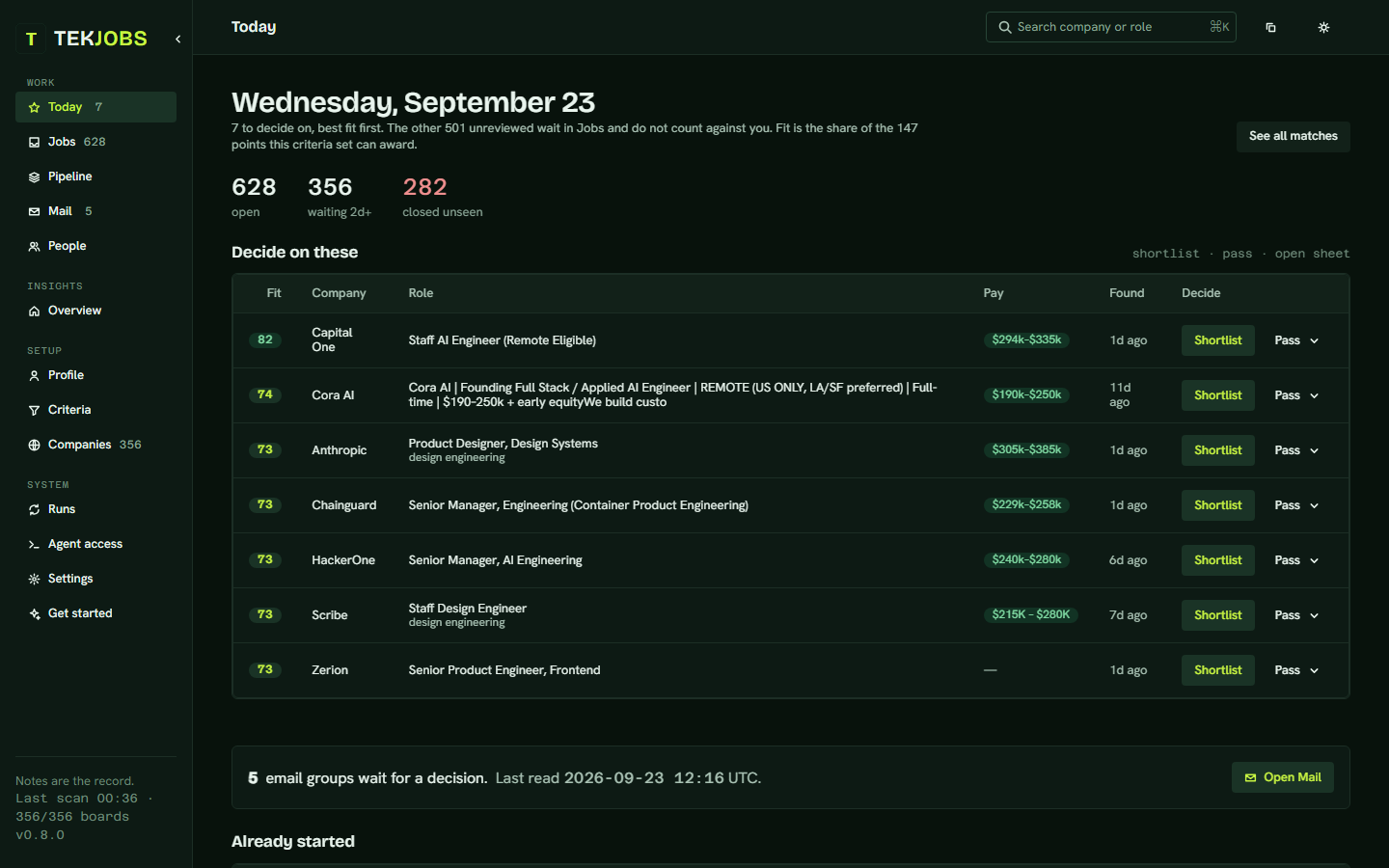
Today: the decision queue, in-flight applications, and what has gone quiet
Company boards
304
Postings a run
25k
MCP tools
44
TekJobs accounts
0
Showreel

What it does, in forty-five seconds

The morning scan, the cut to the few that fit, every point written down, the Today list, the pipeline, your AI over MCP, and the one step it leaves to you.

Motion graphics, not a screen recording. The companies are the fictional ones in the sample vault; the reasons, the scores and the tool names are what TekJobs itself writes and serves. The postings count is illustrative. For one real, unedited run, watch the demo below. Sharing it? There is a vertical cut and a square cut.

Transcript
  1. 07:30. The clock strikes and tekjobs scan runs, daily, while you sleep.
  2. Scan. Rows of boards (Greenhouse, Lever, Ashby, Workday, the big career APIs, remote feeds, job alert emails) light up as the scan passes: 304 company boards, tens of thousands of postings.
  3. The cut. The postings swirl together and fall away until fourteen are left, each with its score.
  4. Score. One match, Staff Design Engineer at Northwind Labs, and why it matched: title +50, seniority +10, description +31, remote +15, pay +17, fresh +25. The points add up on a ring to 148.
  5. Today. A short list, not a feed: six to decide on, best fit first. One goes to reviewing, one is passed, the next goes to reviewing.
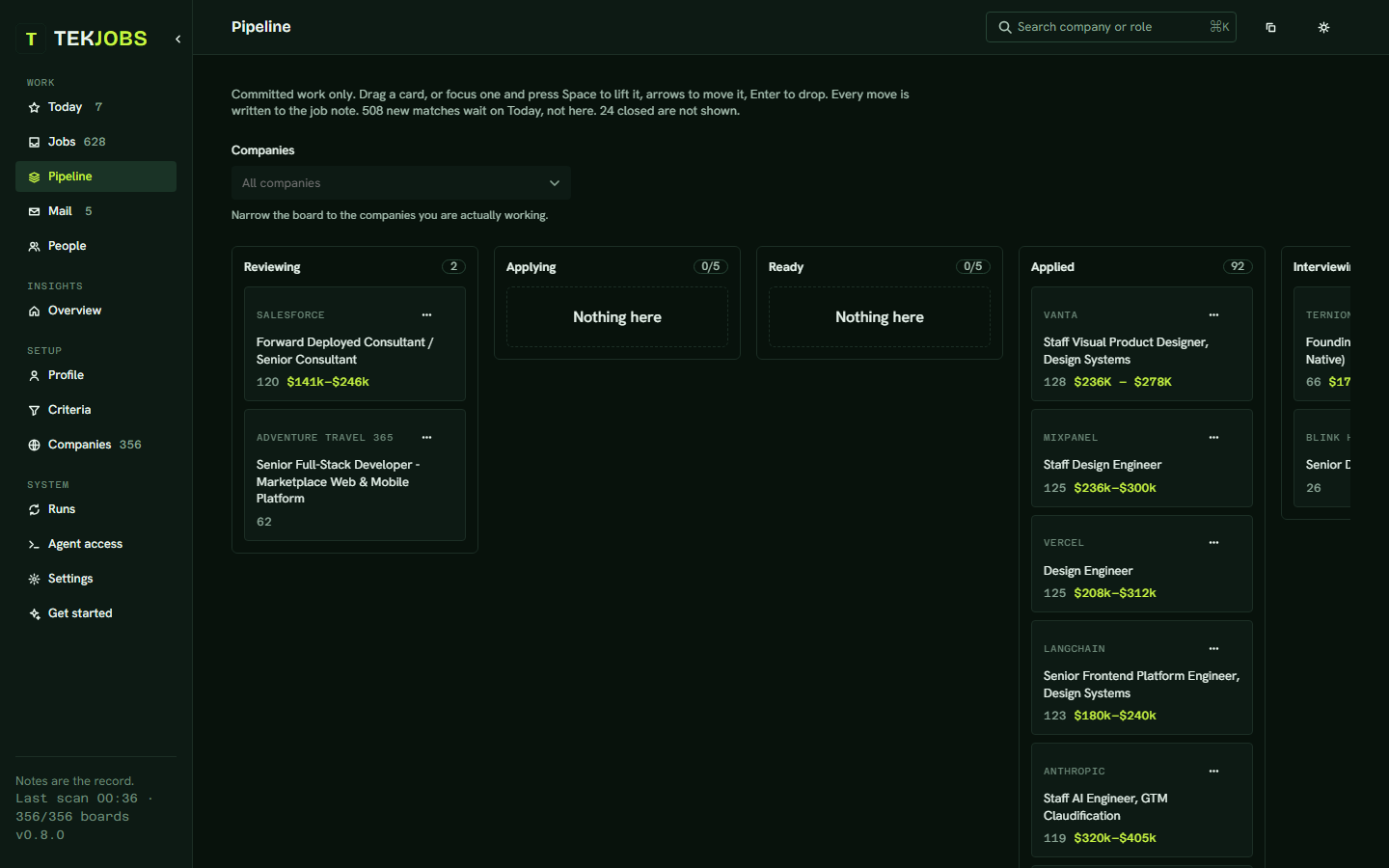
  6. Pipeline. The Northwind card is dragged from Applying to Applied, Interviewing, and Offer.
  7. Your AI. In Claude Code: claude mcp add tekjobs -- tekjobs mcp connects 44 tools. "Tailor my resume for Northwind Labs" calls application_packet, tailored_resume_materials and save_tailored_resume, and answers that the draft was checked against the resume of record, saved to the note, and nothing was sent.
  8. It stops before send. The application is filled in; the AI's cursor stops short of Submit. You review. You click.
  9. Plain markdown, on your disk: the profile folder's notes, no TekJobs account, MIT open source.
  10. Closing card: TekJobs. A job search that remembers who you are. npx @timurtekb/tekjobs init.
See it run

Install, be interviewed, see your first Today

Fifty-seven seconds, recorded from one real run on the fictional sample resume: the init command, the interview in Claude Code, the first scan of 304 boards, and the Today page it produced.

Nothing in it is staged: the terminal output, the interview transcript and the screenshots are from the same run, and only the folder path was shortened. The companies on the Today page are real postings found that morning.

Transcript
  1. Install. In a terminal: npx @timurtekb/tekjobs init ~/Obsidian/JobSearch --resume ~/Downloads/resume.pdf. The output names the profile folder, the four starter notes it created, the resume it imported, and the onboarding steps still open. Then: claude mcp add tekjobs -- tekjobs mcp, which connects the server to Claude Code.
  2. Interview. In Claude Code: "Use the tekjobs MCP server. Call onboarding_status, then onboarding_materials, and follow its script." The model reads the resume and asks eight questions in one message: target titles, seniority, work mode, pay floor and stretch, keywords and exclusions, company stage, links, earliest start. The answers go back in one message; it writes the profile and the criteria and starts a dry scan.
  3. Scan. In the terminal: tekjobs scan. 304 boards in about two minutes, then the top fifteen still open with their scores, companies, titles and locations.
  4. Today. The app's Today page: seven matches to decide on, best fit first, each with company, role, pay band and a Shortlist or Pass button. Then the Jobs page with one note open: every point it scored, written down as a reason.
  5. Closing card: A job search that remembers who you are. Your notes, your criteria, your AI. Nothing is ever submitted for you.
How it works

Five moments, every day

A scheduled task does the first three before you wake up. The last two are yours, and the app keeps them short.

  1. Scan

    Every morning: the 304 company boards in the starter registry (Greenhouse, Lever, Ashby, Workday and the rest), the Google and Apple career pages, a dozen aggregator feeds, and any boards you add. Tens of thousands of postings a run, deduplicated. All public; the company-board scan needs no API key, and the two optional feeds that do (Adzuna, USAJOBS) bring their own free ones.

  2. Score

    Each posting is scored against criteria you own: title terms, hard exclusions, description keywords, seniority, a remote rule, a pay floor with a stretch band, recency. Every point is written down as a reason.

  3. File

    A match becomes a markdown note in a folder on your machine: the posting, why it matched, a status log, an application packet. Open the folder in Obsidian or anything else. The notes are the record; nothing else is.

  4. Decide

    Today shows the few worth a decision and what is about to close. Shortlist or pass, with a reason. The mail pass reads your inbox for confirmations, rejections and interview invitations, then asks you to confirm each change before a note moves.

  5. Apply

    A tailored resume and a letter written from your resume of record, checked against it, saved into the note. The copy panel holds the answers forms keep asking for. You review, you click send; the app never does.

The app

Built to be read at a glance

Dark by default, one accent used sparingly, every number in mono. Filters are chips, views are links, and the sheet says why a job scored what it scored.
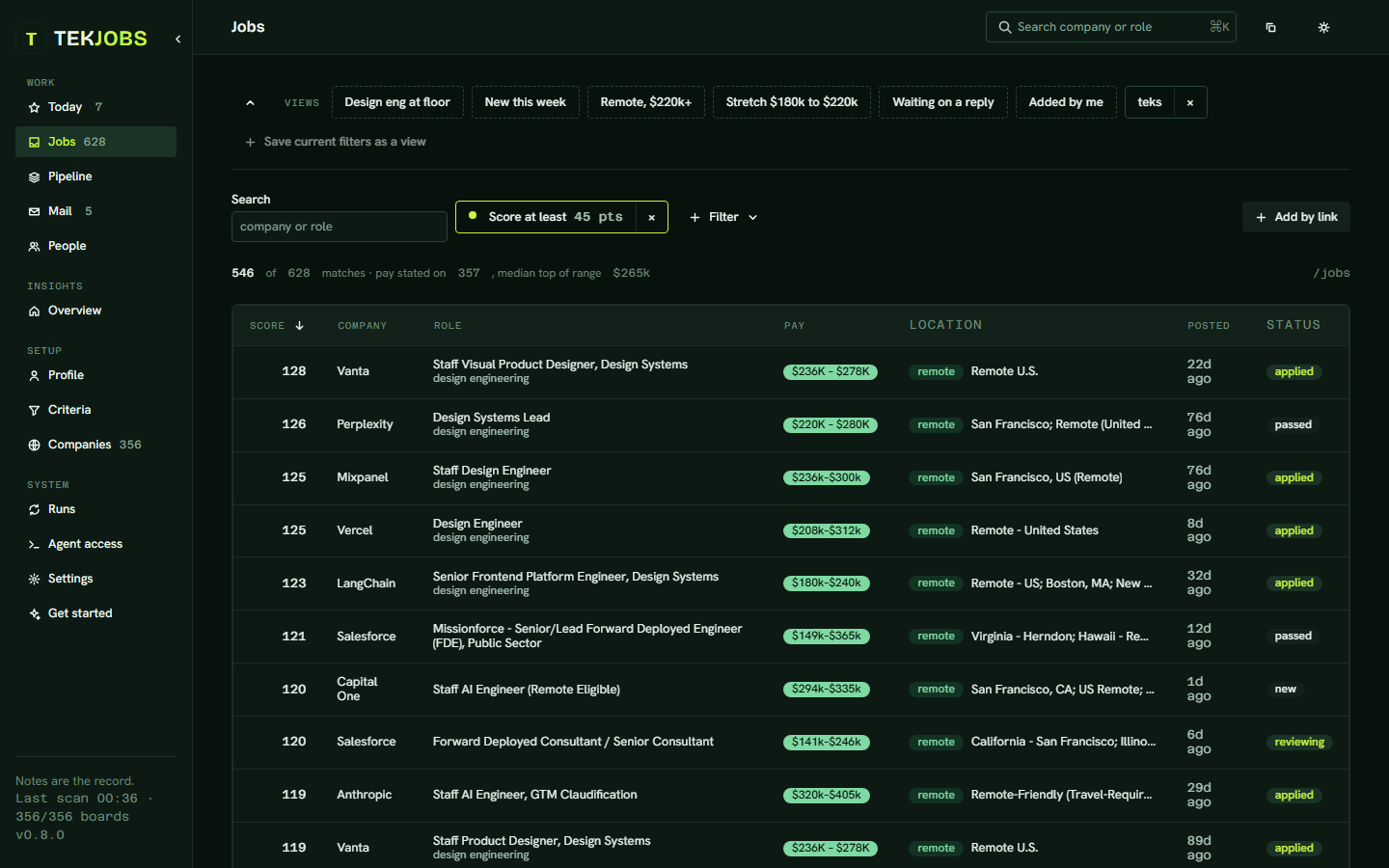
Jobs: the match list beside the open note, with every reason it scored and the points each one earned
Jobs
Pipeline: committed work as columns from reviewing to offer
Pipeline
Who it is for

Built for people who want to stay in charge

Most AI job-search tools begin with an empty prompt. TekJobs begins with what you already know: your experience, what you want, what you turned down and why, where you applied. Your AI works from that record instead of rediscovering you every session, and the record gets better the longer you search.

It fits if

  • You apply across more than one kind of role and want criteria you can read and change.
  • You want to know why a job was recommended, point by point, before you spend an evening on it.
  • You already use Claude Code, Codex, Cursor or another MCP client and want it working from your notes.
  • You keep career notes in Markdown or Obsidian, or would like to start.
  • You want help with applications without anything being submitted for you.

It does not fit if

  • You want a hosted service with nothing to install. TekJobs is a command and a folder on your machine.
  • You want one-click applications sent on your behalf. It stops before send, on purpose.
  • You do not want any AI provider to see your resume. The scan and the notes never leave your machine, but the interview and the drafting send what you choose to the model you connect.
The boundary

What it will not do

A job search is a series of claims about things that happened to you. The software drafts and files; the claims stay yours.

It never submits an application.

Drafts are written into the note and stop there. Applied, interviewing and offer are statuses only a person can set, because only a person knows.

It never touches LinkedIn on your behalf.

No profile scraping, no automated messages. A single job link you paste is read once, the way a browser would open it.

It never sends mail.

The mail check runs with only Gmail's read tools allowed and every write tool denied by name. The model extracts; matching and every change to a note is ordinary code, and nothing changes until you confirm.

Your files stay with you.

The scan runs on your machine, the notes live in your folder, and there is no TekJobs account or server holding a copy. What does leave: the requests to public job boards, and whatever context you choose to send to the AI provider you connect, which processes it under its own terms. No telemetry, no separate model API key, nothing sent on your behalf.

For employers

Post a job where the reader runs the search

TekJobs users do not browse a board. Their software reads hundreds of them every morning and scores each posting against criteria they wrote. A posting here is one more source in that scan: no inbox blast, no promoted slot, no list of who looked. The people it fits find it, with the reasons.

  1. Write it

    Title, company, location and whether it is remote, the pay range, and the description. The pay range is required: a posting without one scores lower in every TekJobs user's criteria, and most of them have a floor.

  2. Pay once

    $49 for 30 days, through Stripe. No subscription, no per-view charge, no upsell. The refund policy is one page.

  3. It enters the morning scan

    The posting becomes one more source every TekJobs user's software reads the next morning, scored against that user's own criteria like any Greenhouse or Ashby board. It is never emailed, pushed or promoted; it is found.

  4. Fits apply to you directly

    A user whose criteria the posting clears sees it on their Today page with the reasons it scored, and applies through your own link. We are not in the middle of the application, and we never hand you a list of who saw it.

$49 for 30 days

One posting, paid once. It runs for 30 days or until you close it.

What scores well here
  • State the pay range, in the posting itself.
  • Say remote, hybrid or on-site plainly, with the country or time zone that applies.
  • Use the real title. Design engineers search for design engineer, not for rockstar.
  • Describe the work in the description: stack, systems, what the first quarter looks like. Keywords in the text are what the score reads.
Numbers

Counted, not claimed

The board and tool counts are read from the repository on every build. The postings figure is from the author's own vault on 22 September 2026. The board registry is in the repository as a markdown table, and pull requests to it are the most useful contribution.

304

company boards

In the starter registry every new profile folder begins with: eleven board platforms plus the Atlassian, GitHub, Spotify and Amazon career APIs and the Google and Apple pages. Add your own; the author's vault watches 356.

25k

postings a run

The author's vault, 22 September 2026: fetched, deduplicated across sources, scored, and cut to the ones that clear the bar. About a minute on a laptop.

44

MCP tools

Claude Code, Codex, Cursor or Claude Desktop can run the whole search over the same notes: find, move, draft, add boards, start scans, read the mailbox.

0

TekJobs accounts

No TekJobs account, no hosted search database, no separate model API key. A folder of markdown, a scheduled task, and the AI client you already have.

Requirements

What it needs from you

Nothing personal lives in the repository. Your profile folder, criteria, notes and mail state are outside it; the repository is the code and the starter notes.

Node 20 or newer
One command installs it. The scan has one dependency, for reading PDF resumes.
A folder for your profile
Plain markdown. Obsidian is the nicest way to read it, and not required.
An AI client that speaks MCP, signed in
Claude Code, Codex, Cursor or Claude Desktop. It runs the interview and, over MCP, the search. No separate model API key: TekJobs adds no per-call AI billing, and usage follows the client you already have. The setup for each is one page in the docs.
Claude Code with its Gmail connector, for mail
Optional, and the one thing that needs Claude Code specifically. Check mail is boxed to Gmail's three read tools.
Get started

Install, import a resume, be interviewed

One command creates your profile folder and imports the resume. The interview then runs inside the AI client you already have: it reads the resume, asks the few things a resume cannot say, writes your profile and criteria, and runs the first scan. After that a scheduled task does the mornings.

About twenty-five minutes end to end on a fresh machine, most of it the interview. Not ready to use your own resume? The repository ships a fictional profile folder to look around in first.

Everything after the first scan is in the docs: the profile folder, scoring, mail, people, the copy panel, letters and resumes, and the 44 MCP tools.

terminal
npx @timurtekb/tekjobs init ~/Obsidian/JobSearch --resume ~/Downloads/resume.pdf
npm install -g @timurtekb/tekjobs         # so the morning task has a command that lasts

# Connect your AI client. Claude Code is one line; Codex, Cursor and Claude Desktop are in the docs.
claude mcp add tekjobs -- tekjobs mcp

# Then say:
#   "Use the tekjobs MCP server. Call onboarding_status, then onboarding_materials, and follow its script."

tekjobs serve        # the app on http://127.0.0.1:8787
tekjobs schedule     # the morning scan, every day at 07:30